A Complete Guide to Image Usage in Your Book (or Other Commercial Project)
Let’s say you’re writing a family memoir. You’ve got scans of old family photos and letters, plus some modern photos you took on your smartphone. But! Your grandpa fought in WWII, and you’d really like to include a photo of the warship he sailed on. You don’t have that image in your personal collection, so you say to yourself, “I’ll just find it on the internet!”
Hold it right there, sonny! You could get yourself into a copyright infringement mess! Your personal photos are automatically copyrighted to you, unless the subject matter includes trademarked items. So, how can we legally harvest images from the internet without getting in trouble?
Before you upload a book, these are the rules IngramSpark and Amazon (KDP) use to question your copyright:
Does your Title (your book and its content):
-
- Include someone’s name, the name of a famous company, or a famous brand without a license from the owner?
- Include trademarks, pictures or names of famous brands, toys, games, or companies without a license or the owner’s written permission?
- Include pictures copied and pasted from the web or any other place without a license or the owner’s written permission?
- Include the work of someone other than yourself without a license or the owner’s written permission?
- Include misleading cover images or information that may cause someone to buy the Title thinking it is something else?
Notice the keyword license. While you’re definitely not allowed to publish a book containing images copy/pasted from all over the internet, there are some resources that allow public use.
Mega-Override: Brands
No matter if an image distributor says that a photo is free-to-use, if the image contains a famous brand, logo, sports team, character, toy, artwork, game, food product, person, or even some architecture, it should not be used unless you have explicit written permission from the copyright holder.
For example, if you take a photo of Nissan Stadium in Nashville, TN, you’ve got several strikes against using that image in a commercial work: the Nissan logo, the Tennessee Titans logo, and any current event sponsor posters on the wall. Even though you took the photo yourself, you don’t have the right to distribute images of those logos.
Another example is the Leaning Tower of Pisa. While personal selfies are permitted during the daytime, nighttime photography of the famous architecture is strictly monitored. Once the structure is illuminated under the night sky, it is considered an artwork and express permission must be granted for a commercial shoot.
If a big brand discovers that you’ve been distributing images of their copyrighted content in your published book, they may have grounds to take legal action against you.
Royalty-free
There is a common misconception that royalty-free images are safe to use in any context. These, however, are some of the most tightly restricted. A royalty-free image is one for which you may purchase a one-time or multi-use license, with the understanding that you are not obligated to pay sales royalties to the owner.
If you choose to use these in your books, be aware that there may be limits on how many books can be sold under the original license, and other restrictions you need to understand before using them.
Creative Commons (CC)
What is a Creative Commons image? As per the Creative Commons official website:
Creative Commons licenses offer a standardized, legally sound way to grant permission in advance, so that creators can clearly communicate how their work may be used, without negotiating individual permissions every time. This enables access to knowledge by offering a “some rights reserved” option for content that would otherwise be closed off.
https://creativecommons.org/cc-licenses/
CC licenses allow creators to keep their copyright while granting the public permission to use their works under clearly defined terms. Just because an image has a Creative Commons tag does not mean it is a free-for-all-use situation!
There are six TYPES of Creative Commons licenses that fall under different labels (refer to chart). Remember, these are donations from creators, and they may have restricted usage terms. Some works will be labeled as non-commercial (nc), which means they cannot be used for resale (AKA, your book). The no rights reserved (cc0) tag allows full usage with zero restriction or attribution.
https://libraryguides.etown.edu/c.php?g=649306&p=6822402
Unless an image is labeled as Public Domain (CC0), at minimum, author attribution is required.
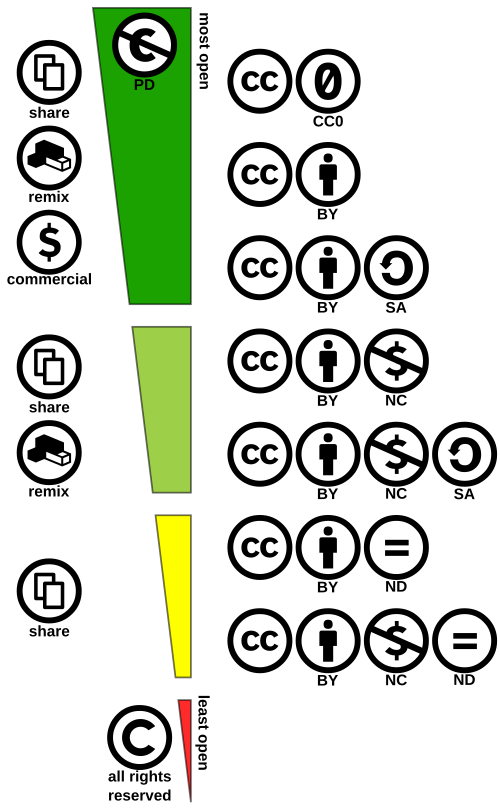
By Shaddim; original CC license symbols by Creative Commons – https://creativecommons.org/about/downloads/https://creativecommons.org/policies Original CC license icons licensed under CC BY 4.0, CC BY 4.0, https://commons.wikimedia.org/w/index.php?curid=47247325
Public Domain/No Rights Reserved (CC0)
Most corporate-created works that enter their 95th year become public domain and are free to use without restrictions. Individually-created works (such as a self-published book) become public domain 70 years after the author’s death. There are a few exceptions to these rules, such as works that failed to renew their copyrights within the required deadlines.
In addition, a creator can choose to add their work to the public domain by applying for a CC0 (Public Domain Dedication), waiving all their rights and allowing the work to become free-to-use in any way: https://en.wikipedia.org/wiki/Public_domain_in_the_United_States
Pexels.com is a site that allows free download of all images, but not unrestricted (CC0) use: https://www.pexels.com/license/
“Don’t sell unaltered copies of a photo or video, e.g. as a poster, print or on a physical product [your book!] without modifying it first.”
Just because it’s free and easy to download doesn’t mean you can publish it in your book! Check all sites’ documentations first!
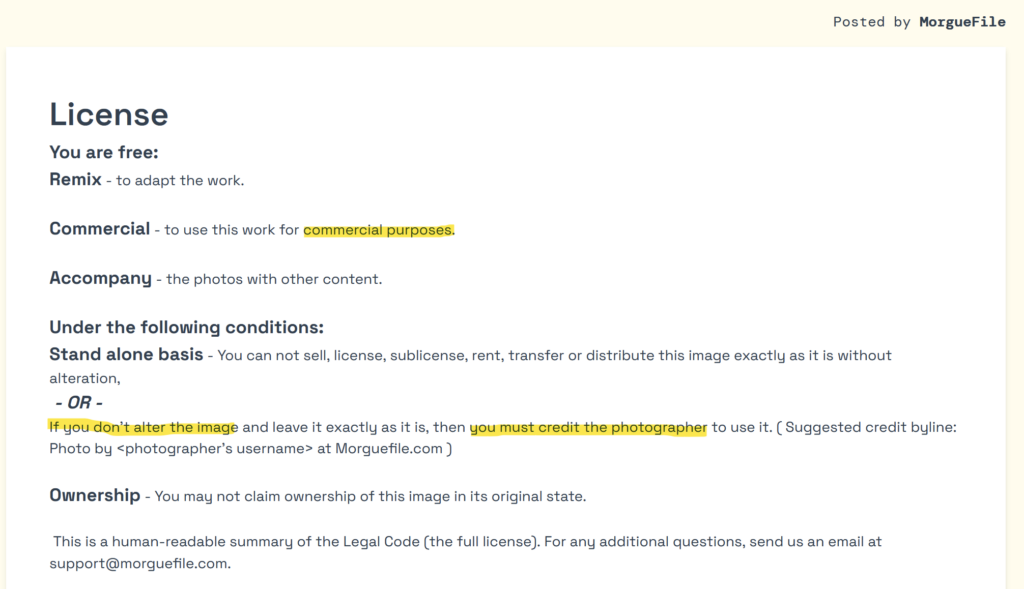
There are a few sites that feature many cc0-labeled (Public Domain Dedication) images, such as Morgue Files. You simply need to create an account to download images, although non-modified images still need accreditation: https://morguefile.com/license
ALWAYS check a site’s licensing page for specifics.
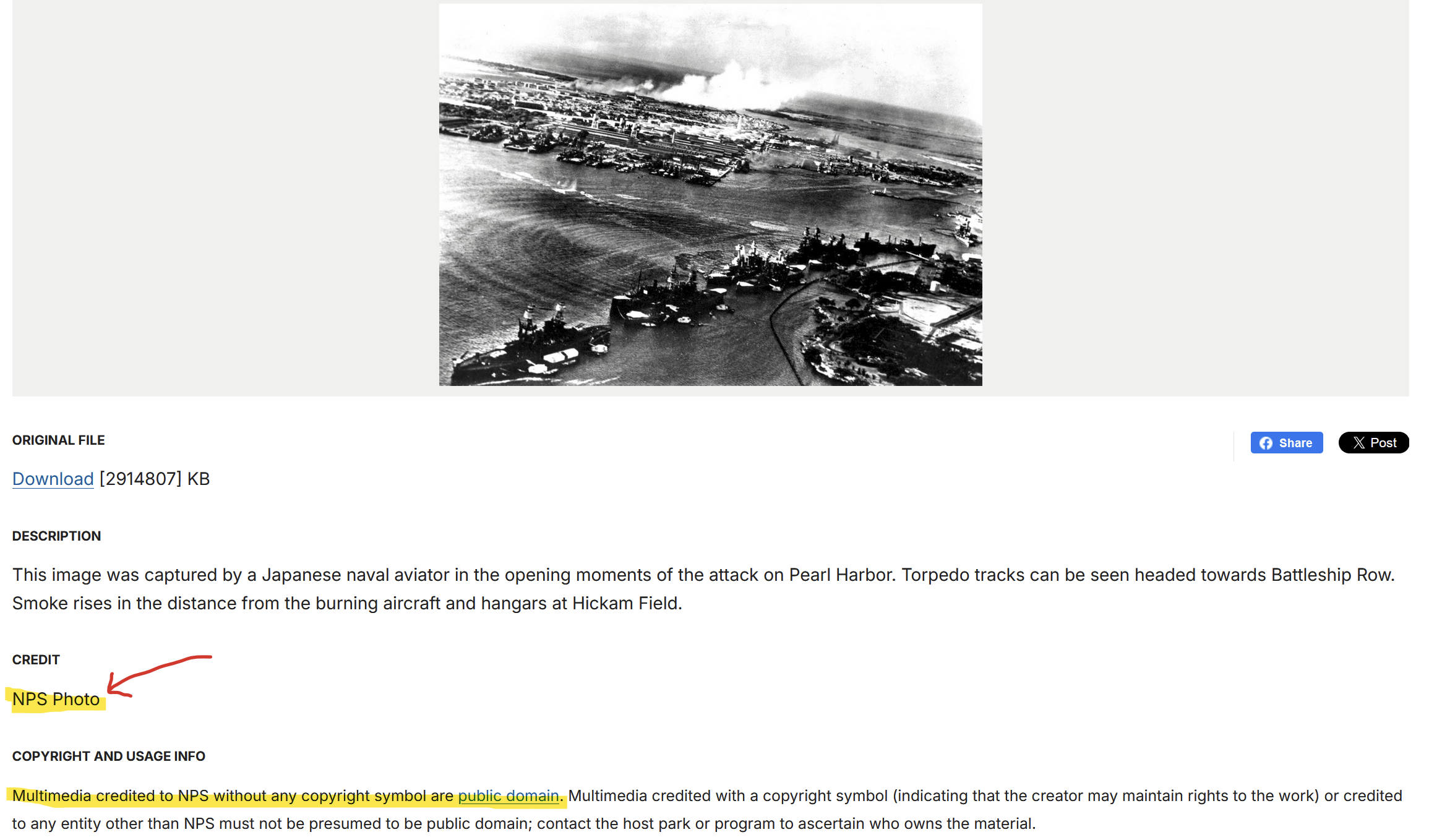
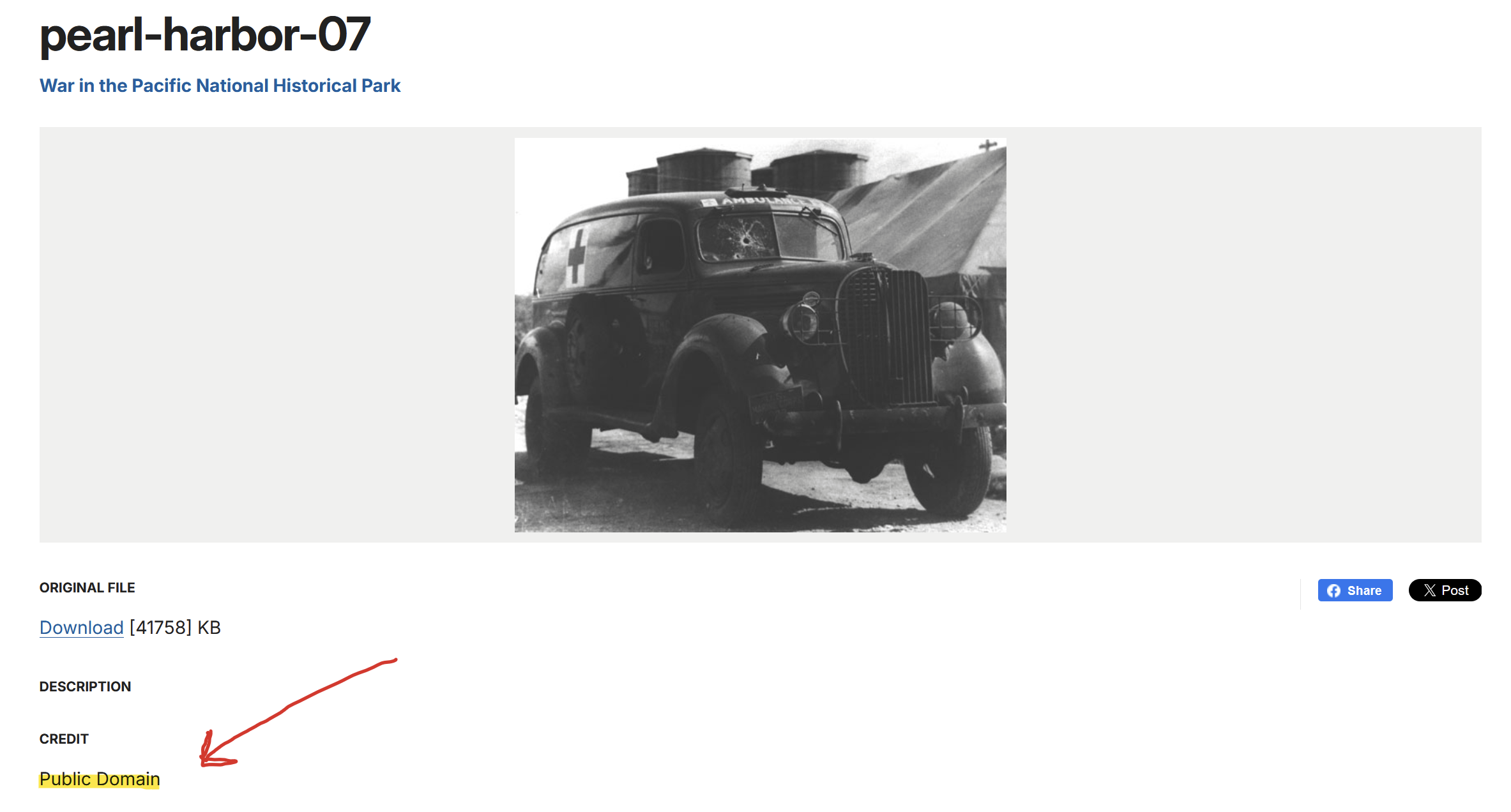
CC0 Example: National Park Service Website
https://www.nps.gov/media/multimedia-search.htm
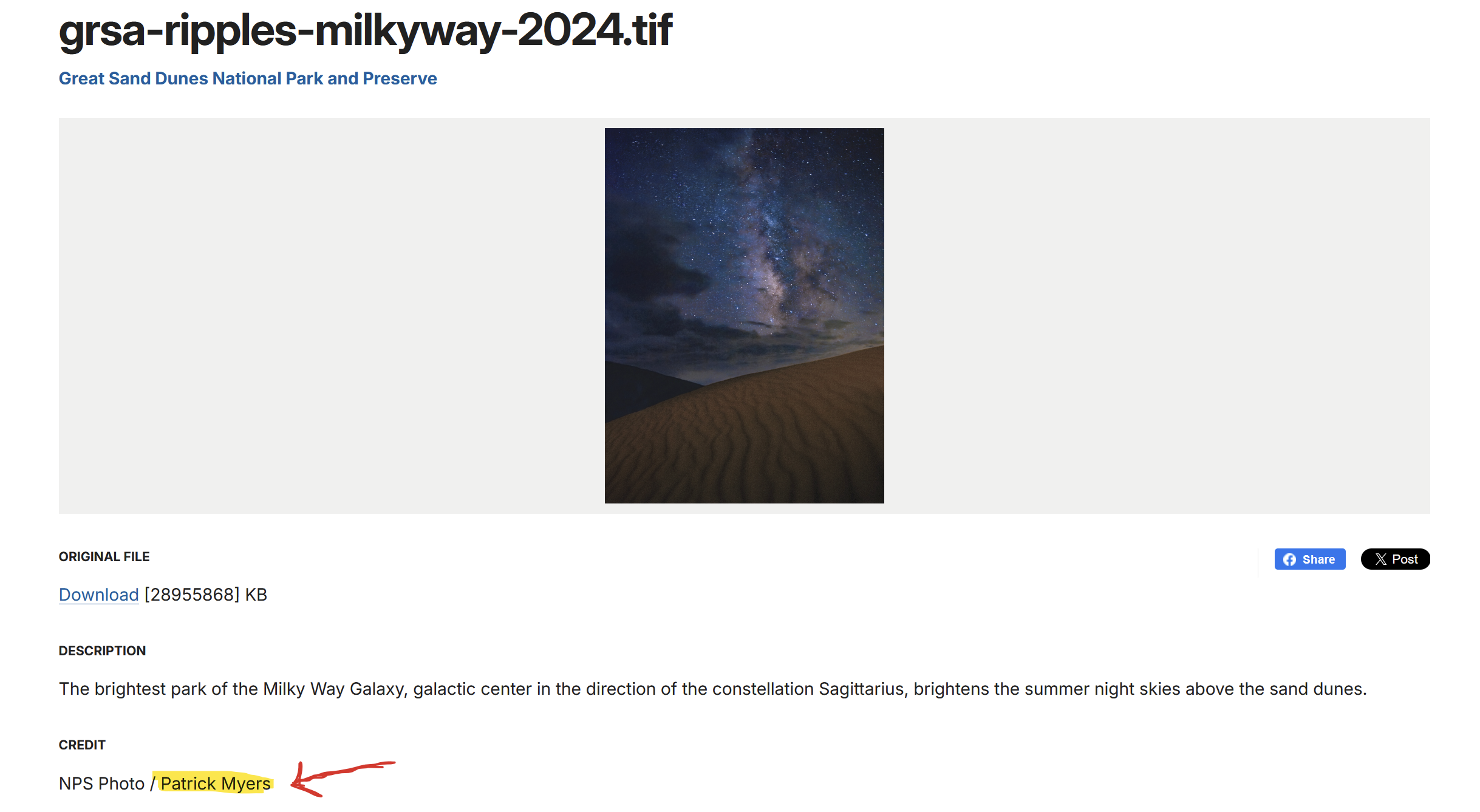
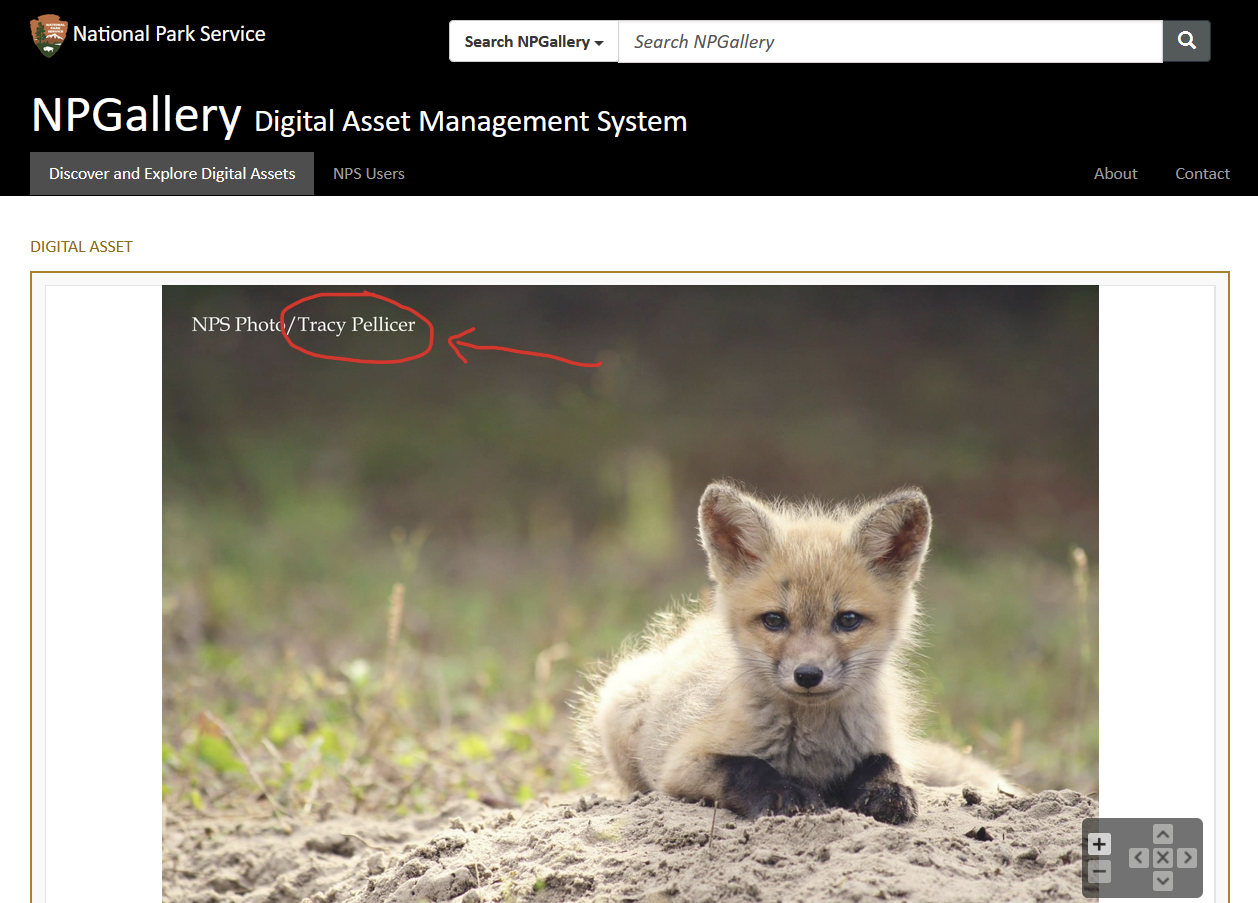
The National Park Service (NPS) clearly outlines that images provided via their media gallery are public domain unless the accreditation includes another creator besides NPS.
Safe to use for commercial purpose
Not safe to use for commercial purpose
2026 Public Domain (CC0) Distributors by Category
Commercial-friendly, accreditation required:
Zero restrictions (CC0) distributors:
- https://negativespace.co/
- https://gratisography.com/license/
- https://unsplash.com/license
- https://www.flickr.com/creativecommons/cc0-1.0/
- http://www.imageafter.com/index.php
- https://isorepublic.com/license/
- https://negativespace.co/license/
- https://www.publicdomainpictures.net/en/index.php
- https://stocksnap.io/
Historical (CC0) distributors
- https://www.getty.edu/art/collection/search?open_content=true
- https://archive.org/details/universal_newsreels
- https://www.nps.gov/media/multimedia-search.htm (Check each image! Some have restrictions.)
Small fee (CC0) distributors:
Must modify base images for commercial use:
Thanks to this article from Eckerd College for these reference links.
What’s the Catch?
You’ll notice that most of these CC0 distributors have advertisements all over—typically for Shutterstock or iStock: stock photo sites which do not offer CC0 or public domain imagery. Be careful that you’re not accidentally clicking an ad; you’ll end up on a very expensive pay-per-image site!
Long Story Short
The most important thing to remember when collecting photos for commercial purposes is to check the site’s licensing! Public domain tags mean you’re good to go. Creative Commons means you need to check for author-specific restrictions or requirements.
If you still can’t find the image you’re looking for, you’ll likely need to buy a professional stock photo—one that includes a commercial-grade distribution license. Additionally, you can pay a photographer or an illustrator to capture exactly what you had in mind (so long as it doesn’t include copyrighted brands).
And if you’re considering Artificial Intelligence (AI), just know that (as of 2026), robot-created works CANNOT be copyrighted. For example, if you want to copyright or trademark a character in your children’s book, it must be a human-created work. AI-generated works are not eligible for legal protections and, if at all possible, should not be used for high-importance items.
Public Domain (CC0)
- Commercial-friendly
- All rights to distribute without modifications
- No attribution required
Creative Commons (CC)
- 6 different license types
- MUST check specific requirements
- SOMETIMES commercial-friendly
- Attribution almost always required
Royalty-free
- May have limited usage rights
- Read the license carefully